
Integrations
Discord Rich Presence
AppleBlox can display your Roblox activity on your Discord profile. Enable it from Integrations > Discord Rich Presence.
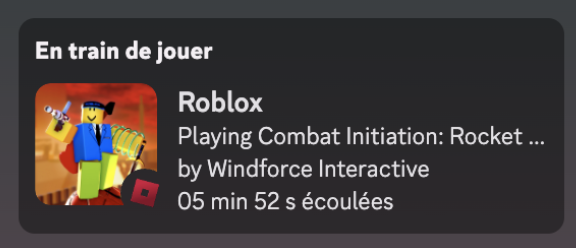
Options:
- Game Activity - Show which game you're currently playing.
- Play Time - Display an elapsed time counter.
- Join Button - Let others join your game directly from Discord.
Rich Presence updates automatically when you join or leave games. When idle in the app, it shows "Browsing the app."
Bloxstrap SDK
Games that support the Bloxstrap SDK can send custom data to AppleBlox. When enabled under Integrations > Bloxstrap SDK, games can:
- Override Discord Rich Presence with custom images, text, and buttons.
This allows game developers to show richer information on your Discord profile beyond the default game name and icon. Enable Discord RPC Control under the SDK settings to allow this.
Game History & Activity
AppleBlox can track your gaming sessions to power features like the Quickplay page and server rejoining.
Game History
Enable under Integrations > Game History. When on, AppleBlox records:
- Up to 30 recent games.
- Up to 10 servers per game, with player counts and region info.
- All data stored locally. It never leaves your machine.
Server Location Notifications
Enable under Integrations > Game Activity > Server Location. When you join a game, a notification shows the server's geographic location (city and country), detected via the server's IP address.
These features work together: game history feeds the Quickplay page, and server data lets you rejoin specific servers you've played on before.